
Buzzy Buddy User Guide
Thank you!
We’re so glad you have your own Buzzy Buddy! Each one is built with love and care, to be given homes where they will be loved and used.
Each Buzzy Buddy is built with our custom components, designed to provide soothing stimulation to each user.
How To Use A Buzzy Buddy
*Not suitable for children under 3 years old; contains small parts and electronics
*Adult supervision recommended, especially for younger children
*Use only as described in this manual. Do not allow use while sleeping unless supervised.
Inspect your Buddy regularly and discontinue use if damaged.
To begin using your Buzzy Buddy, follow these instructions:
Locate the button in the left ear of the Buzzy Buddy, and hold for approximately 3 seconds. When your Buddy turns on, you will begin to feel the paws vibrate alternately.
Your Buddy has 3 different frequencies of vibrations. You can switch between them by briefly pressing the button contained within the ear while the bear is on. You should feel the frequency of the vibrations change within 1-2 seconds of pressing the button.
When you are finished using your Buddy, locate the same button within the ear, and hold it for approximately 3 seconds to put the bear back into ‘sleep’ mode.
To preserve the battery, our Buddies are designed to automatically return to ‘sleep’ mode after 10 minutes of use with no user input. If your Buddy goes into sleep mode, simply turn the bear back on to continue use. (Note that each time the button in the ear is pressed to change the frequency, the 10-minute use timer resets.
How To Change A Buddy’s Batteries
*Batteries not included
*Batteries should be replaced by an adult
*Dispose of batteries in accordance to local regulations
Each Buddy is powered by 3x AAA batteries, located in the black enclosure that is contained in the zipper pocket in the back of your buddy.
When your Buddy’s batteries require changing, simply unzip the back of the buddy, and remove the black battery enclosure. Locate the small white connector placed just inside the black enclosure, and remove by pulling gently on the wires, ensuring that you are tugging on all 6 wires evenly to prevent damage to the connector.
Once the connector is removed, locate the two screws in the black enclosure and remove them carefully. Then, locate the three AAA batteries and replace them, taking note of their orientation to ensure proper operation after replacement.
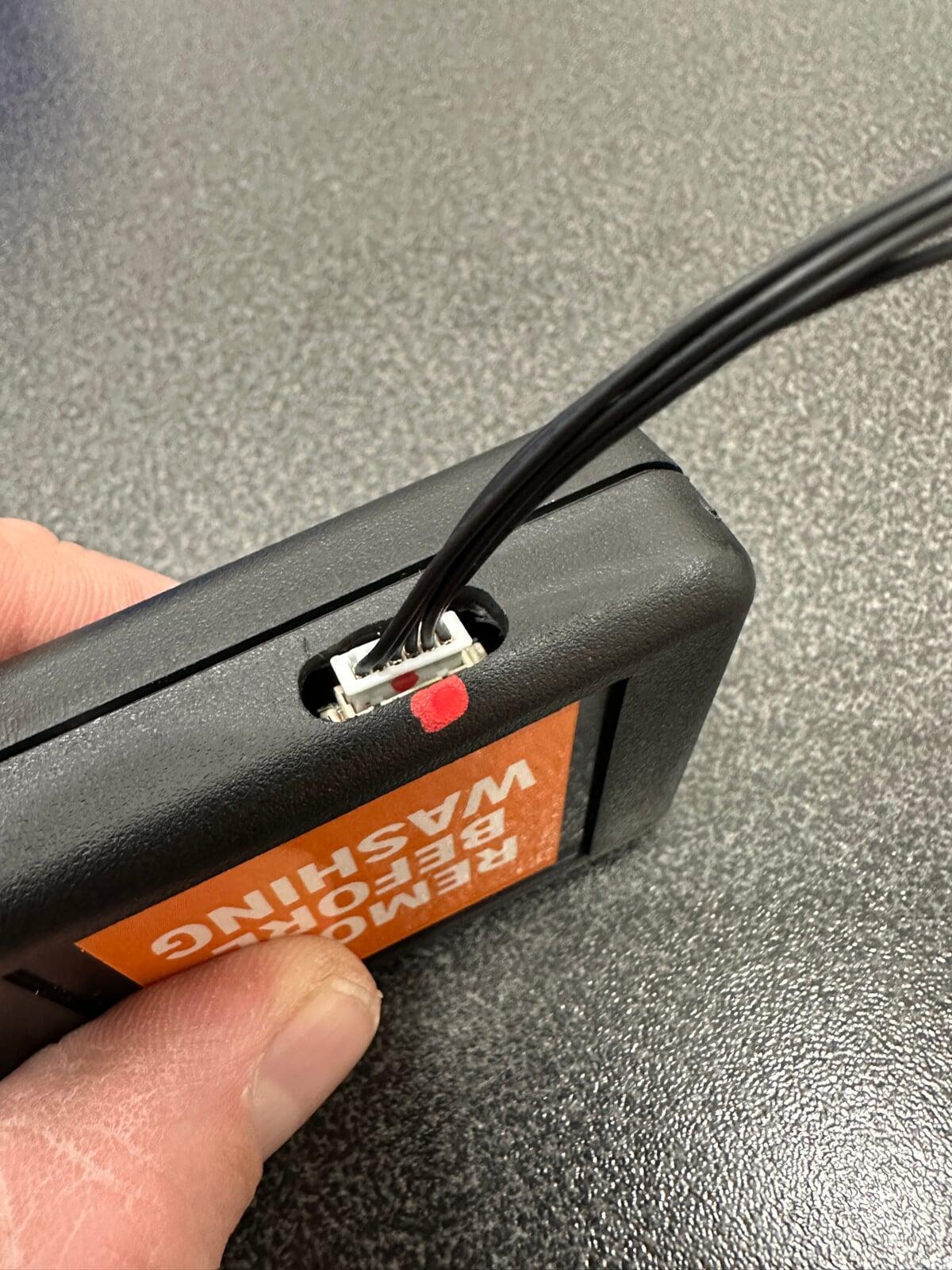
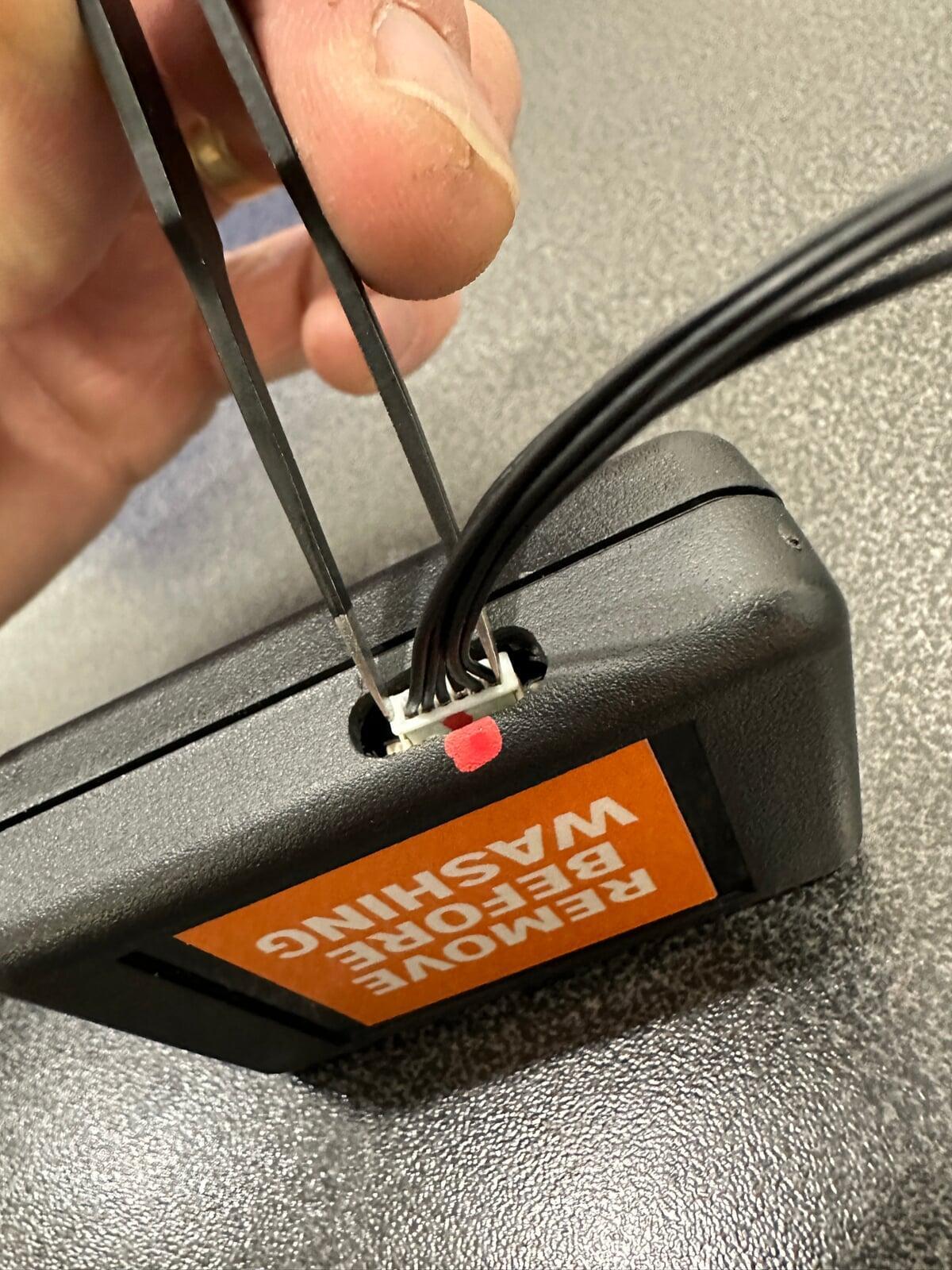
To reinstall the connector to the control board, simply ensure that the paint marks on both the connector and the electronics enclosure are facing each other (see Figure 1). Gently push the connector to begin seating it. If you are unable to seat the connector with your fingers alone, we recommend use of a blunt pair of tweezers or a similar instrument. This will allow you to apply even pressure to both sides of the connector, and gently push it to seat it completely on the control board. (See Figure 2)
How To Wash A Buzzy Buddy
*Electronic components within black enclosure are not waterproof.
*Keep product away from fire and other heat sources
When your Buddy is in need of a wash, unzip the pocket in the back of the bear, locate the small white connector placed just inside the black enclosure, and remove by pulling gently on the wires, ensuring that you are tugging on all 6 wires evenly to prevent damage to the connector. Place the enclosure aside.
Once the battery/electronics casing has been removed from the bear, the bear can be washed on a gentle washing cycle, in warm water. (The electronics that remain in the bear are designed to be waterproof.)
Please ensure that:
The zipper is CLOSED during the wash cycle
The zipper is OPEN during the air-drying period
To prevent damage to the electronics that are within the bear during the wash cycle, do NOT place the bear in a dryer. When your bear has been washed, let your Buddy air-dry for a minimum of 24 hours before use, to ensure no moisture remains inside the bear.
After the drying period, re-insert the white connector to the control board (see How to Change A Buddy’s Batteries for reference and helps). Ensure the connector is fully seated before securing the electronics enclosure within the bear.
***Failure to follow the recommended washing instructions will result in damage to the electronics within the bear, and can also effect the feel and look of the bear skin. Failure to follow these instructions will also void any existing warranty on your Buddy.***
Troubleshooting Your Buddy
If your Buddy is not working as expected, try these steps. If these steps do not resolve the issue you are experiencing, please email us and we will be happy to assist!
My Buddy won’t turn on
Check to be sure the batteries are properly installed and fresh. Replace if unsure.
Ensure the white connector is completely seated on the control board. See Figure 3 and Figure 4 for references of seated vs not seated connector.
Your Buzzy Buddy’s Warranty
We don’t expect that you will have any issues with your Buddy, but if you do, your Buddy comes with a warranty that covers things like:
Electronic component failures
Plush defects
Stuffing
Your Buddy’s warranty is active for 1 year from the date of purchase, on all components listed above.
Note that abuse or misuse of the product may void the warranty coverage on a particular components. (i.e - not following the washing instructions properly) Should you experience a concern with your Buddy, simply reach out to our team, and we will be happy to help.
Should your Buddy have an issue after the warranty expires, simply reach out to our team. We offer repair services for Buzzy Buddy owners and will be happy to get your Buddy working properly once again.
Additional Warnings
*Do not disassemble or modify the electronic components.
*Do not use if electronic module is loose, exposed, wet, or damaged.
*This product is not a medical device and is not intended to diagnose, treat or cure any medical condition.
*Responses to sensory products vary by individual. This product is designed for comfort and sensory support. If irritation, discomfort, or distress occurs, discontinue use.
Contact Us
We don’t expect that you’ll have any issues with your Buddy, but if you do, our team at SOS Play is here to support you. Use our contact information below to get in touch with us for questions, concerns, or any issues that you have with your Buddy.
Should your Buddy become damaged outside of the warranty coverage mentioned, please contact us for repairs.
Scan the QR code below to register your Buddy.
Why register your Buddy?
Receive care guide and instructions to keep your Buddy running smoothly.
Receive product safety updates (only if needed)
Help us reach you quickly in the unlikely event of a recall
What you'll need:
Your Buddy's BATCH CODE as found on the tag inside the pocket
An email address
We don't collect children's names or health information. Registration is optional.

Email us at: support@sosplay.com
Send us a direct message on social media:
Instagram: @sosplay_llc
Facebook: SOS Play